I have a Linux server that runs more than one public site, including the blog you are reading. It isn’t a big machine, but it is production, and when it breaks, real people notice.
I wanted to know whether it was actually secure. That question is too big to answer as asked, so I broke it into five smaller ones. Who can log in, and how much can they do once they are in? Which of its services can the internet reach? How quickly do known vulnerabilities get fixed, and do the fixes actually take effect? If something went wrong, would I find out, and could I reconstruct what happened afterwards? And if the data disappeared, could I get it back, how long would that take, and how much would be lost?
Hardening checklists are everywhere, and working through one isn’t hard. The hard part is judgement. How do you know a setting is really in effect? How do you know an all-clear isn’t just the result of looking in the wrong place? Nearly every trap I hit was of the second kind, so this is not a checklist. It is about how to judge each of those questions, and where the obvious checks go wrong. Every sample output below is a generic one I constructed, not real data from this machine, and the machine’s actual configuration and results stay out of this post entirely.
Tie your own hands first
Auditing a production machine has two worst outcomes: locking yourself out, or taking the service down. The first usually happens while editing the SSH configuration, the second while quickly fixing something on the side. So the first rule I set was that the audit would be read-only. The audit looks and does not touch. Every change comes afterwards, one group at a time, each one checked again the moment it is made.
Meaning to be read-only is not the same as being read-only. An audit has to run a pile of commands as root, and a tool that runs as root is the single biggest risk on the machine. I later turned these checks into an open-source tool, server-hardening-audit, and the first principle I wrote into it was that read-only has to be enforced by the code, not promised by whoever runs it.
The mechanism is a default-deny command allowlist. It isn’t a list of dangerous commands to block. For each program, it spells out the exact argument grammar the program may be called with: which subcommands, which options, what shape each argument takes. Anything that doesn’t match is refused, the check reports UNKNOWN, and the refusal itself is kept as evidence. It is the same principle you judge a firewall by: deny by default, allow the minimum, and make every allowance reviewable. A blocklist is a firewall with a default-allow policy, one forgotten verb away from failing. The allowlist is tested in both directions too: every command a check can issue has to pass, and a long list of commands that change state has to be refused.
Next, no shell. Commands run as argument vectors, from a fixed PATH, with a minimal environment. Without a shell there are no pipes, redirects or command substitutions to inject into, so that whole class of problem disappears, and where a manual procedure would pipe into grep, the filtering happens in Python instead. Then, every executable has to be owned by root and not writable by its group or anyone else. The allowlist only holds names, and a name is only as trustworthy as the file behind it; if another account could swap that file out, the name means nothing. Reading files is default-deny as well, and only paths on an allowlist of configuration files may be copied verbatim.
Sensitive sources need more care. The evidence an audit leaves behind is already a map of the host. Storing password hashes, private keys, or commands with database passwords in them on top of that would be a second leak. So these sources are summarised at the moment they are read, and only the summary reaches the disk: which accounts have empty passwords, the type and comment of each public key, the schedule of each timed job, the number of bans per day.
There are a few commands I deliberately don’t run, and each has a substitute. apt-get update rewrites the package lists, so I read the lists already on disk and report how old they are. unattended-upgrade --dry-run writes logs and takes the apt lock, so I read its configuration, its timers, the periodic stamp and its log. lynis audit system writes to /var/log, and when I tried it, it also ran apt-get update along the way, so I only read a report that already exists. sysctl can write as well as read, so kernel parameters come straight from /proc/sys. openssl s_client is a general-purpose network client, so the TLS check uses Python’s standard ssl module and connects only to loopback.
Configuration files lie
The first question is who can log in. The obvious move is to open /etc/ssh/sshd_config and check that PasswordAuthentication is no. That turned out to be the most instructive trap of the whole audit.
On Ubuntu, the main sshd configuration begins with Include /etc/ssh/sshd_config.d/*.conf. The included files are sorted by name and read before the rest of the main file, and for each keyword, sshd keeps the first value it reads. So an early-sorting drop-in overrides the main file, and some cloud images ship a drop-in that turns password login back on. One more detail: the glob matches only *.conf. A file renamed to .bak is neither a backup nor a way of switching something off. As far as sshd is concerned, it doesn’t exist.
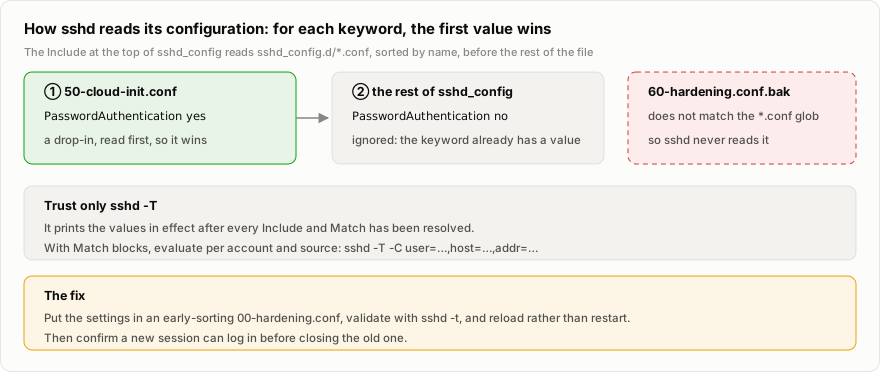
Here is a constructed example:
$ grep -i passwordauthentication /etc/ssh/sshd_configPasswordAuthentication no
$ ls /etc/ssh/sshd_config.d/50-cloud-init.conf   60-hardening.conf.bak
$ cat /etc/ssh/sshd_config.d/50-cloud-init.confPasswordAuthentication yes
$ sudo sshd -T | grep -i passwordauthenticationpasswordauthentication yes
The main file says no. What is actually in effect is yes. The conclusion is simple: trust only sshd -T, which prints the values in effect after sshd has parsed every file. It has to read the host keys, so it cannot run without root, and the honest verdict in that case is UNKNOWN. If the configuration contains Match blocks, evaluate it per account and source with sshd -T -C user=…,host=…,addr=…. To fix it, put the settings in the earliest-sorting drop-in, 00-hardening.conf for instance, validate the syntax with sshd -t, reload rather than restart, open a new session to confirm you can still get in, and only then close the old one.
Evidence from inside the host only proves the setting is configured. You also have to show it holds from the outside. The way to do that is to connect from another machine without offering any credentials, and read which authentication methods the server is willing to accept:
[email protected]: Permission denied (publickey).The parentheses should contain publickey and nothing else. You need both pieces of evidence: the first shows the configuration is right, the second shows the internet sees the same thing.
sudo has a similar trap. Reading only /etc/sudoers misses the sudoers.d/ directory, and when sudo reads that directory, it skips any file whose name contains a dot or ends in ~. If someone put a grant in a file called admin.conf, that grant has never been in effect. The opposite mistake is more dangerous: watching only the sudo group misses docker and lxd. Anyone who can start a container can mount the entire host filesystem into it, so members of those groups are root in all but name. The more reliable approach is to cross-check two lists, one of who is in a privileged group and one of who is running processes and services. Application accounts should belong to no privileged group, and every privileged human account must appear on a declared list of administrators. For authorized_keys, I record each key’s type, comment, option names and RSA size, and never the key itself.
Last comes multi-factor authentication. Plenty of people treat key-only login as secure enough, but a private key file is a single factor, something you have. Its passphrase is unlocked on the client, where the server cannot check it, so it is not a second factor either. Real MFA means either a FIDO2 hardware key, the ed25519-sk kind, whose private key never leaves the hardware and which needs a physical touch at every login, or AuthenticationMethods publickey,keyboard-interactive combined with a TOTP PAM module. The check passes if AuthenticationMethods requires two methods, or if every key is an sk- FIDO key.
Look from the outside
The second question is which services the internet can reach. The obvious move is to read the firewall rules, and they can mislead you in several ways. Rules written only for IPv4 leave services exposed over IPv6. What the configuration says should be listening may not be what is listening. Failing to reach port 443 from outside doesn’t mean the certificate is broken either: if the origin only accepts connections from the CDN, a direct connection is supposed to time out, so a report needs separate states for unreachable and non-compliant. The most counterintuitive case is Docker, whose published ports bypass the host firewall.
When Docker publishes a port, it inserts its own rules into the NAT table and the FORWARD chain of iptables or nftables. An inbound connection is rewritten by DNAT in PREROUTING to point at the container, then forwarded to it through the FORWARD chain. It never passes through the INPUT chain, which is where ufw keeps its rules. So a port that ufw has never allowed can still be reachable from outside.
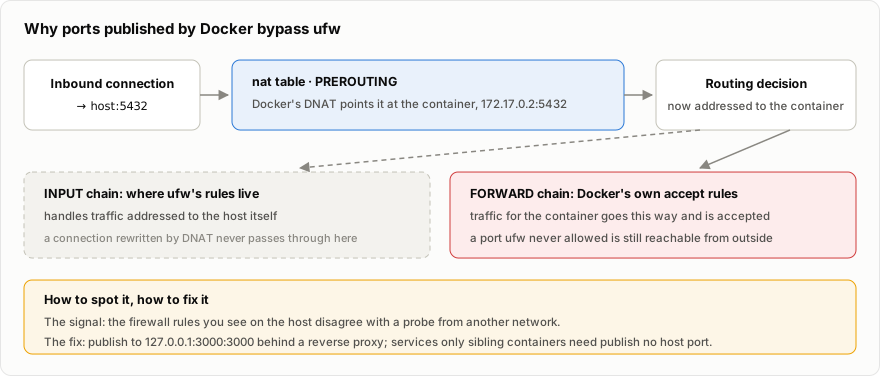
In practice it shows up as a disagreement between what you see on the host and what a probe from outside finds:
$ sudo ufw statusStatus: active
To                         Action      From--                         ------      ----22/tcp                     ALLOW IN    Anywhere80,443/tcp                 ALLOW IN    Anywhere
$ docker ps --format '{{.Names}}: {{.Ports}}'analytics: 0.0.0.0:3000->3000/tcpdb: 0.0.0.0:5432->5432/tcp
# probing from another machine3000/tcp  open5432/tcp  open
The fix is to publish the port on the loopback address, as 127.0.0.1:3000:3000, with a reverse proxy in front. Services that only sibling containers need, a database for example, should publish no host port at all.
A reliable check works on two levels. On the host, read the resolved policy of whichever firewall frontend is in use, ufw, firewalld, nftables or iptables, and look at the default policy and at every port open to any source. Then check what is really listening with ss -tlnp and ss -ulnp: every port on a non-loopback address must be on the declared list of public ports. If Docker is installed, read the HostIp of every published port from docker inspect. The check passes if inbound traffic is denied by default for both IPv4 and IPv6, every port open to any source is on the declared list, and every container port is bound to loopback.
From outside, connect from another network to every port that should be open and every port that should be closed, probing IPv4 and IPv6 separately. A completed connection means open, a refusal means closed, a timeout means filtered. If any undeclared port is open, the check fails.
These two sources of evidence differ in kind, and the report keeps them apart. What is collected on the host is machine evidence. The external results come in as a signed statement, from a person or from the probing tool. In my reports the first shows as PASS, the second as PASS · attested, and anything still waiting for its statement is marked pending. When the two conflict, the rules are explicit. A statement cannot turn a machine FAIL into a PASS. An external observation that contradicts a machine PASS turns it into a FAIL, because what the internet can actually reach outranks what the configuration says it can. The one exception is a narrower view: when the external check sees less, only the authentication methods, say, and not whether root may log in, its PASS does not contradict a FAIL from inside.
No error is not a pass
The third question is patching. Turning on automatic updates doesn’t mean they run, and installing a patch doesn’t mean it has taken effect: after a kernel or library update, the old code keeps running in memory until the next reboot. There is a subtler mistake as well, which is running apt-get update first to see the latest state. At that point, the audit has changed the very machine it was supposed to observe.
What I do is look at four things together: the automatic-update configuration, the state of its timers, the periodic stamp, and the time of the last run recorded in its log. Pending security updates are worked out from the package lists already on disk, along with how old those lists are. Past a threshold, 48 hours for instance, the verdict is UNKNOWN, rather than a quiet update followed by a guess. For reboots, I look for the /var/run/reboot-required flag and how long it has been there. The check passes if automatic updates are enabled, the timer is on, it has run within 48 hours, and there are no pending security updates and no reboot flag.
Saying “I don’t know” is more honest than guessing, and that principle runs through the whole audit. A missing command, insufficient permission, output that can’t be parsed, data that is too old: all of it is UNKNOWN, with the reason written down. An empty output is kept as evidence, but it only counts as a pass when the rule itself asks for emptiness, as in “nothing listening outside the declared ports”, and never as “nothing went wrong”.
The fourth question is whether I would find out if something happened. fail2ban running doesn’t mean fail2ban is working, because it may be watching a log file the system no longer writes to. journald running doesn’t mean the logs survive, because if its storage mode is volatile, a single reboot wipes them.
To tell whether fail2ban is working, I use a rule that sounds backwards: zero cumulative bans on a public SSH port is a FAIL. The internet is never that quiet. A public SSH port gets scanned without fail, so zero bans means it is reading the wrong log. In this constructed example, the jail is watching a file nobody writes to any more, while the system journal shows more than two thousand failed login attempts over the same period:
$ sudo fail2ban-client status sshdStatus for the jail: sshd|- Filter|  |- Currently failed: 0|  |- Total failed:     0|  `- File list:        /var/log/auth.log`- Actions   |- Currently banned: 0   |- Total banned:     0   `- Banned IP list:
$ sudo journalctl -u ssh --since "24 hours ago" | grep -cE "Invalid user|authenticating user"2316
As evidence, only the number of bans per jail per day is kept, never the attackers’ addresses. For journald, the effective Storage= setting has to be worked out from the main configuration and every drop-in, and then you check whether /var/log/journal exists. For audit tooling, the check wants auditd running or AIDE installed.
A backup file is not a restore
The fifth question is whether lost data can be recovered, and this is where most of the mistakes happen. There is a backup script, but nobody has looked at when the newest backup was made. There are backup files, but no retention policy, so sooner or later they fill the disk. The backups live on the same machine, so they vanish along with it. Even permissions get misread: a backup file with mode 0644 looks readable by anyone, but if its parent directory is 0700, nobody else can get to it. Permissions have to be read along the whole path, not just on the file.
The more reliable approach starts with the schedule, whether cron or a systemd timer, although the evidence keeps only the timing and a few keyword flags and never the command itself, since backup commands often carry the database password. Then the age of the newest backup is compared with the declared RPO, and there has to be a retention policy. An offsite copy is invisible from the host, so a person has to attest to it. When the retention policy can’t be seen, because it lives inside a script for instance, a person attests to that as well, rather than anyone guessing.
Even if all of that holds, it only shows that a backup exists. Whether it can be used is something only a restore drill can answer. The first rule of a drill is never to test a restore against the production database. Start by finding the newest backup and recording its size, time and sha256; an unusually small file is a finding in itself. Then verify its structure without restoring anything: pg_restore --list for a database dump, tar -tf for a tar archive, restic check for a restic repository. A backup whose contents cannot even be listed cannot be trusted:
$ pg_restore --list demo.dump;; Archive created at 2026-06-01 03:00:12 UTC; dbname: demo; TOC Entries: 214; Compression: gzip; Format: CUSTOM; Dumped from database version: 16.4;; Selected TOC Entries:;3412; 1259 16385 TABLE public accounts demo3415; 1259 16402 TABLE public orders demo3418; 1259 16427 TABLE public events demo...Next, restore it into a brand-new throwaway target with a name that cannot be confused with production, such as demo_restore_test, and time the whole thing. If the restore complains about missing roles or owners, use the options that skip ownership and privileges, --no-owner --no-privileges.
Once it is done, reconcile. Run the same set of queries against the source and the restored copy: row counts for each main table, and the timestamp of the newest record. Here is a constructed result:
table source_rows restored_rows source_latest restored_latestaccounts 18,402 18,402 2026-06-01 02:58:41 2026-06-01 02:58:41orders 241,117 241,090 2026-06-01 03:07:55 2026-06-01 02:59:58events 1,904,332 1,903,871 2026-06-01 03:08:02 2026-06-01 02:59:59The source has slightly more rows than the restore, and that is normal, because production kept writing while the drill ran. What you do is record the time of the dump’s snapshot and the differences, then check that they make sense in direction and size. The source can only have more, never less, and the surplus has to match the write rate. Real failures look different: the restored copy holds less than the data at dump time, whole tables are missing, or the restored database turns out to be a different one altogether. That last one is more common than it sounds, so after the numbers, you check the meaning: is this the right data, with the sites, tenants and accounts you expect? When the drill is over, the throwaway target gets deleted, after asking first.
Two figures come out of a drill. RPO is set by the backup interval: back up once a day and you can lose up to 24 hours of data. It belongs in the declaration, and the tool checks whether the newest backup is older than that. RTO can only be measured by a drill, as the measured restore time plus a realistic time to switch over, which means changing DNS, changing configuration and checking the sites. An RTO that has never been drilled is a guess.
One rule of data discipline runs through all of this: dump files and query results that contain personal data never leave the server. The only things that come out are metadata, meaning sizes, checksums, table lists, row counts and timings.
Translating evidence into framework language, without overclaiming
With the technical checks done, the next step is often to map the results onto a framework, such as the Australian Signals Directorate’s Essential Eight or Annex A of ISO/IEC 27001:2022. This is where it is easiest to overclaim.
ASD puts it plainly in the November 2023 edition of the Essential Eight maturity model:
The Essential Eight has been designed to protect organisations’ internet-connected information technology networks.
It is aimed at an organisation’s network, not at a single host. Applied to one Linux server, many requirements at Maturity Level One name workstations, Office, web browsers, email clients and PDF software, none of which apply to a server. Others do apply but cannot be seen from the host: asset discovery, the cadence of vulnerability scanning, the approval of privilege requests. Those are organisational processes, and a host’s logs hold no evidence of them. Two more are easy to place at the wrong level. As ASD’s Essential Eight assessment process guide (October 2024) explains, multi-factor authentication at Level One focuses on online services, and MFA for administrative logins to servers sits at Level Two. Application control at Level One likewise covers only workstations, and internet-facing servers come in at Level Two. So whether SSH uses MFA only counts as evidence toward a higher level in this framework.
The way my tool splits it, Level One has 48 requirements. Of those, 22 do not apply to a server, 15 apply but never leave evidence on a single host, and only 11 can be evidenced from the host at all. ASD’s rule is that a mitigation strategy reaches a level only if every applicable requirement is effective, so when most applicable requirements cannot be seen from the host, the honest conclusion for most strategies is not determined rather than achieved. That says nothing about how well any particular machine is run. It is simply how little one host can prove.
Two ideas have to be kept apart. Not applicable means the requirement has nothing to do with this kind of host, like Office macros on a Linux server. Not assessed means it does apply, but there is no evidence this time, like a vulnerability-scanning process. Folding the second into the first makes coverage look much better, and it is the most common dishonesty in tools of this kind. One step further: partial evidence can falsify but cannot verify. Evidence from a host can show that something was not done, but on its own it can never show that it was.
Then there is the case where you find a problem and decide not to fix it yet. You record the reason, who accepted it and when it will be reviewed, and the report shows FAIL · risk accepted (review by …), which turns into REVIEW OVERDUE once that date passes. The point is that a FAIL stays a FAIL. In the Essential Eight view it is still Ineffective, because ASD’s assessment guide does not let a risk acceptance stand in for implementing the control. Which risks are fit to accept? My test is that they cannot be exploited directly: even an attacker who knows the problem exists still needs something else they cannot get before it does them any good. Conversely, when you publish a report, a problem that is unfixed and exploitable should be hidden entirely and marked as withheld, not dressed up as not assessed.
The first run on a real machine
The methods read smoothly on paper, but the first run on a production machine still taught me a few things.
The same command behaves differently across versions; some fail2ban parameter queries, for example, are not supported by every version. Because the design reports UNKNOWN whenever something can’t be checked, problems like this surface on the spot instead of quietly passing as a PASS. That is exactly when the rule to say you don’t know earns its keep.
Before installing any package on a production machine, stop Ubuntu’s needrestart from restarting services automatically. By default it restarts every affected service once a package is installed, and on a production machine, restarts belong in a planned window.
For a baseline I used Lynis, but only as a second opinion. Many of its suggestions don’t suit a web server, and some are harmful, such as separate partitions, disabling compilers or installing a malware scanner, so chasing a score of 100 is pointless. I run it before and after the fixes and look at how the score moves. When deciding which suggestions to act on, I weigh three things: how small the change is, how much risk it removes, and whether it would affect the service. The ones that don’t apply are recorded as accepted risks. As noted earlier, Lynis writes logs and runs apt-get update itself, so running it is an operator’s action, not part of a read-only audit.
Finally, the pace of fixing. The procedure I set myself was to back up before changing anything, change one group at a time, re-check that item straight away, confirm the sites still work, and then write down the command that would undo the change. It is slow, but every step can be walked back.
Summary
Looking back, what mattered in this audit was not any particular setting but a handful of rules for judging. Trust the effective state, not the configuration file: sshd -T for sshd, /proc/sys for the kernel. Checks from inside cannot prove reachability, so look from the outside as well. No error is not a pass: whatever cannot be checked is UNKNOWN, and zero bans on a public SSH port is a FAIL. A backup file is not a restore, and an RTO that has never been drilled is a guess. Keep machine evidence apart from human statements, and keep not applicable apart from not assessed.
All of these rules live in server-hardening-audit. It also has one property I care about a great deal: it is reproducible. Every read and every command is recorded, with its arguments and result, in index.json, and audit --replay re-evaluates the saved evidence through the same code path, using the original run’s timestamp. That means the whole engine can be tested without root, a report can be regenerated from old evidence after the format changes, and a third party can re-derive every verdict. Before publishing, I used replay to regenerate the sample report from the first run’s raw evidence, and all 25 results matched. It can also be run again and again: next time, a diff between two runs shows exactly what changed.
The source, the design notes and a sanitised sample report are on GitHub, with the samples in the examples directory. The repository also includes instructions for an AI assistant, so that it can walk someone through an audit under the same discipline and never change anything without their approval.
An audit does not make a machine more secure by itself. What it can do is show you which things you actually know, and which you only think you know.